IT Asset & Service Request Tracker
A full-stack IT management app for a fictional college that tracks equipment, network jacks and switch ports, and service requests from intake to resolution.
- C#
- ASP.NET Core
- Entity Framework Core
- SQLite
- SQL
- React
- TypeScript
- Vite
- Tailwind CSS
- xUnit
- Vitest
- GitHub Actions
- Docker
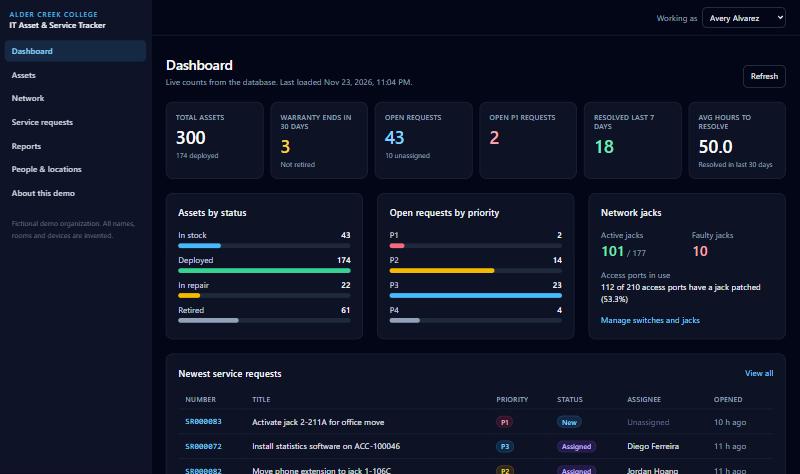
Overview
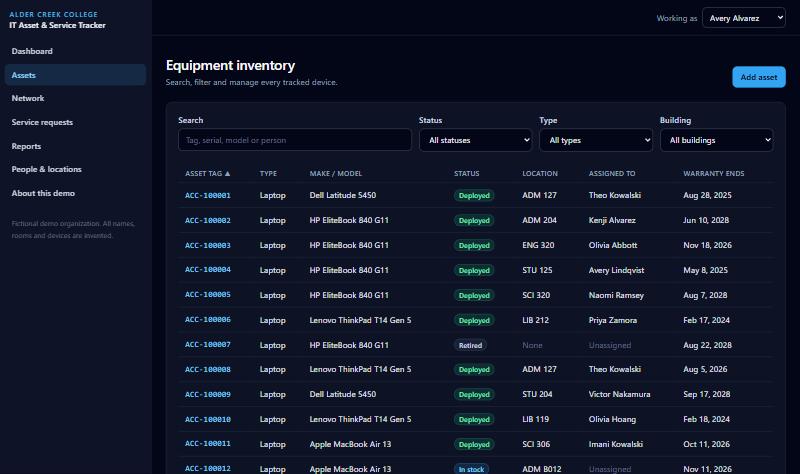
A web app for the IT department of a fictional school, Alder Creek College (all names, rooms, and devices are invented). It keeps equipment inventory, network jack and switch port patching, and service requests in one database, modeled on the records a campus telecom team keeps.
Problem
Campus IT teams often track equipment, jack-to-port patching, and service tickets in separate places, which leads to double-patched ports and lost ticket history.
Solution
An ASP.NET Core Web API with Entity Framework Core and SQLite that enforces the rules on the server: unique asset tags and serial numbers, one jack per switch port, no jacks on uplink ports, only the allowed ticket status changes, and VLANs from 1 to 4094. A React and TypeScript front end shows dashboards and reports where every number comes from a parameterized SQL query.
Key features
- Switches, access and uplink ports, wall jacks, and VLANs are modeled the way a campus telecom team works with them, including patching and activating a jack.
- Jacks can't be patched into a switch uplink: the API refuses with 409 Conflict, and the patch dialog only offers free access ports.
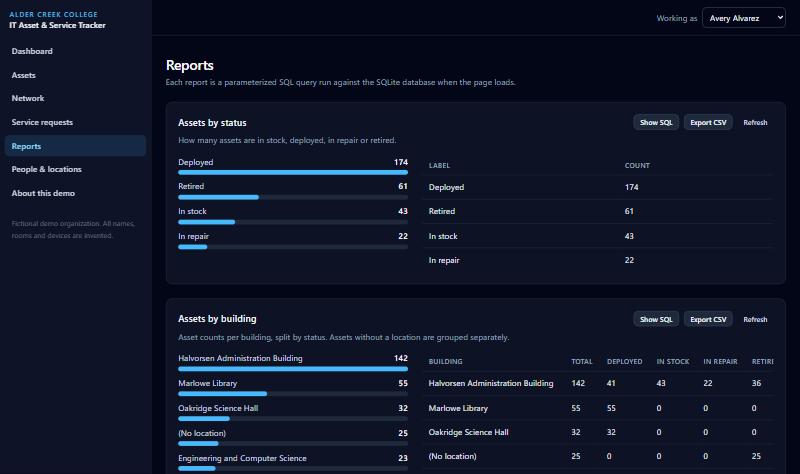
- 8 parameterized SQL reports (warranty expirations, ticket aging, time to resolve, jack utilization, and more), each with CSV export.
- The ticket workflow and assignment history are enforced on the server, with optimistic concurrency that returns 409 Conflict on stale edits.
Architecture
- src/ItAssetTracker.Api/: thin controllers, services with the business logic and the report SQL, domain rule classes, request and response contracts, and EF Core migrations.
- client/: React, TypeScript, Vite, and Tailwind CSS. Its production build is served by the API, so the whole app runs as one service.
- One Docker image (Node build stage, .NET publish stage, small non-root runtime) that reads the port from the PORT variable and has a /api/health check. Hosted on Render's free plan.
Try it or install it
Try the live demo: no install needed. The first visit after a quiet period takes about 50 seconds while it wakes.
Run it locally: install the .NET 10 SDK and Node.js 22.22 or later, then get the code.
git clone https://github.com/enobot/nate.git cd nate/apps/it-asset-service-request-trackerOn Windows, one script restores, builds, and starts the app with demo data.
powershell -ExecutionPolicy Bypass -File .\run-demo.ps1Full setup, test commands, and Docker instructions are in the README.
Testing
- 191 xUnit tests: unit tests for every ticket status change (36 combinations), the asset and network rules, and VLAN range edges, plus integration tests that run the real API against real SQLite files.
- 40 Vitest component tests for the React pages, plus TypeScript type-checking and linting.
- GitHub Actions runs the backend tests, the client checks, and a Docker image build whenever the app changes. All three jobs passed on the first run.
- The hosted app on Render passes its /api/health check and returns the same report numbers as the local build.
- Checked by hand in the browser on desktop and mobile: creating an asset (including validation errors), moving a ticket through its workflow with its history, patching and activating jacks, and the reports.
Screenshots & diagrams
(opens full size in a new tab)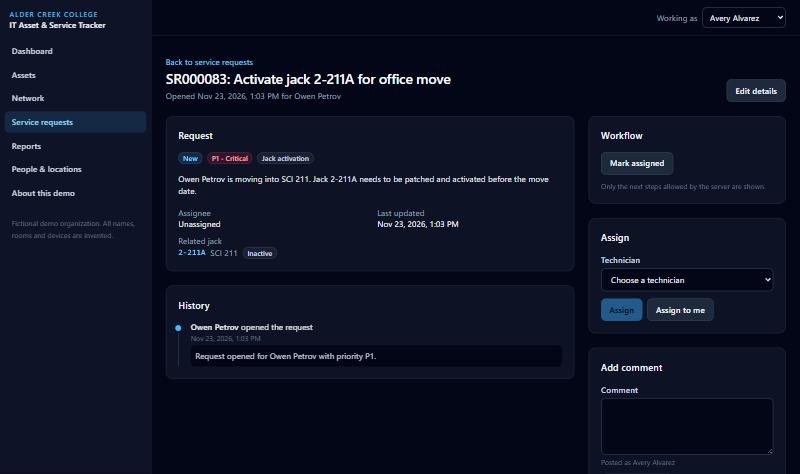 (opens full size in a new tab)
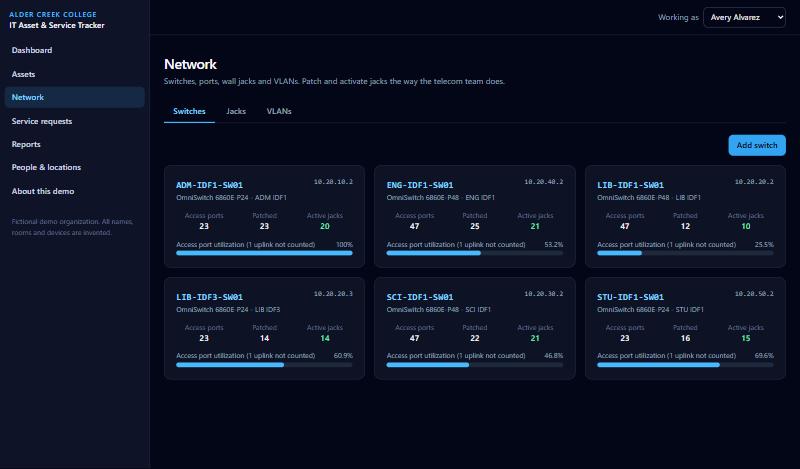 (opens full size in a new tab)
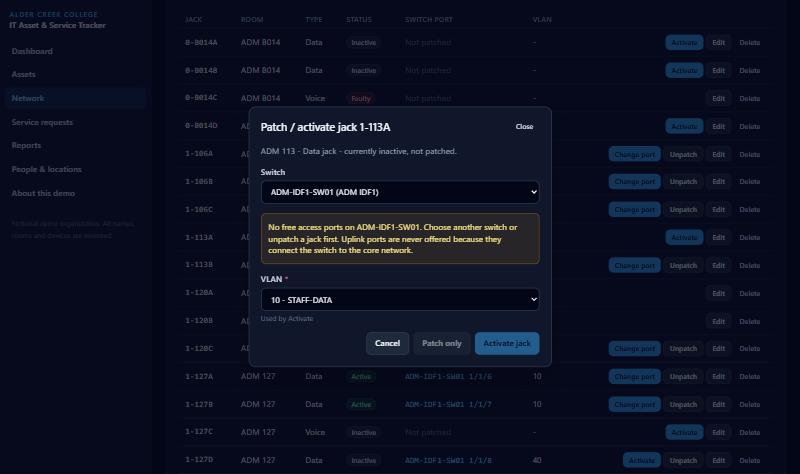 (opens full size in a new tab)
 (opens full size in a new tab)
 (opens full size in a new tab)
Limitations
- No sign-in: anyone who can reach the app can read and change data. The "Working as" picker records who did a ticket action, but the server can't verify it.
- SQLite allows one writer at a time, which is fine for a demo but not for heavy concurrent use.
- Render's free plan puts the demo to sleep after 15 minutes idle (the next visit takes about 50 seconds), and the demo data resets on every restart.
- All data is invented (Alder Creek College). The app hasn't been used by a real IT team.
Who did what
- Portfolio project built by Nathanael Haig.
- The data model is based on the jack, switch port, and ServiceNow ticket work in Nathanael's CSUF IT Telecommunications job.